Why Normalizing Does Not Balance Host and Guest
A host at a good level and a guest recorded far too quiet. Normalizing the file moves both by the same amount and the gap stays. Listen to four versions of the same conversation, read the loudness of each speaker on its own, and see which fix closes the gap without squeezing the host.
By the fix.fm team · Published · Updated
The short answer
Normalizing a file applies one gain change to the whole thing. Peak normalization picks that gain from the loudest peak, loudness normalization picks it from the average, but either way host and guest move together. If the guest was 8 LU behind the host before, the guest is 8 LU behind after. The number on the meter changes; the thing you were trying to fix does not.
Balance lives in the difference between speakers, so it has to be fixed where that difference is: on the guest's own track, or on the guest's own clips if you only have a mixed file and the turns are clean. A leveler on the mixed file is the fallback. It narrows the gap, it does not close it, and it charges the host for the help.
Listen without adjusting the volume
Host, guest, host, guest, six seconds each. These are not level matched on purpose: the point is the level. Set your volume on the first one and leave it. No autoplay.
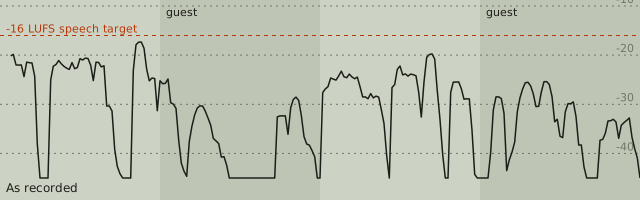
As recorded
The host is comfortable. The guest answers from much further away, and you reach for the volume.
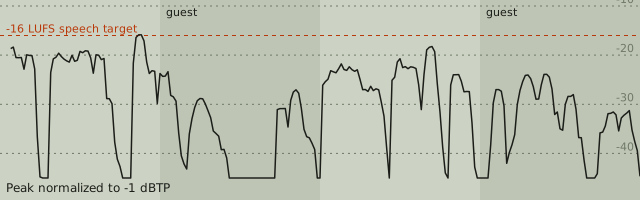
Peak normalized to -1 dBTP
Everything is a little louder. The guest is still exactly as far behind the host as before.
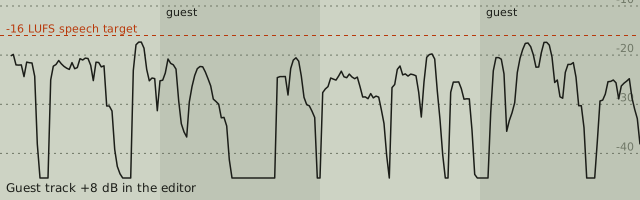
Guest track turned up 8 dB
Both voices sit at the same level. Nothing was compressed; the guest's own dynamics are untouched.
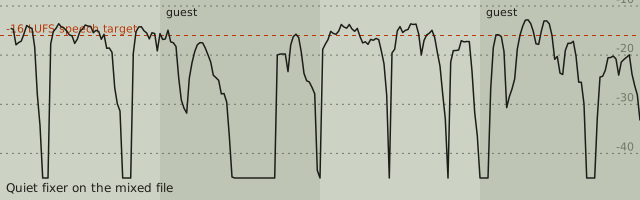
Quiet fixer on the mixed file
Closer, but the host is squeezed to bring the guest up. Listen to the host's emphasis and the room between words.
Two public-domain LibriVox readers, each set to the same loudness, then the guest turned down 9 dB in software to stand in for a distant microphone. Nobody was actually recorded badly. The last version is our quiet-audio fixer at full amount on the mixed file.
Set your playback level on the first example, where the host is comfortable and the guest is not. Then play the normalized version: everything is a touch louder and the problem is identical. The track-gain version is the one that sounds like two people in the same room. The quiet-fixer version is closer, but listen to how the host's loud words no longer rise above the quiet ones.
Why the meter does not warn you
The whole-file reading cannot see this. As recorded, the conversation measures -24.7 LUFS. Peak normalized to -1 dBTP it reads -23.2 LUFS, because the host's peaks hit the ceiling after only 1.5 dB of gain, so that is all a normalizer could give you. The track-gain version also reads -23.2 LUFS. Same number, opposite experience. One integrated figure describes the average of the file; it cannot tell a balanced conversation from a lopsided one with the same average.
Read each speaker separately instead. In the editor, select a clip and the Check readout shows that clip's integrated loudness on its own. If you have separate files, run each through the LUFS meter. The difference between the two readings is the gap you need to close.
See it over time
Each figure is momentary loudness, the 400 ms measurement from EBU Tech 3341 read every 100 ms, across the 24 second conversation. The shaded bands are the guest's turns.
What the numbers say
| Version | Host turns | Guest turns | Gap | Whole file | True peak |
|---|---|---|---|---|---|
| As recorded | -23.1 LUFS | -31.2 LUFS | 8.1 LU | -24.7 LUFS | -2.5 dBTP |
| Peak normalized to -1 dBTP | -21.6 LUFS | -29.7 LUFS | 8.1 LU | -23.2 LUFS | -1.0 dBTP |
| Guest track turned up 8 dB | -23.1 LUFS | -23.2 LUFS | 0.1 LU | -23.2 LUFS | -2.5 dBTP |
| Quiet fixer on the mixed file | -15.9 LUFS | -18.6 LUFS | 2.7 LU | -16.8 LUFS | -1.2 dBTP |
The guest was turned down 9 dB, and the measured gap is 8.1 LU rather than 9 because the two readers' sentences differ in their own loudness; the gap you measure on a real recording will be whatever it is, which is why you measure rather than guess. After normalizing, the gap is still 8.1 LU. After raising the guest track 8 dB in the editor it is 0.1 LU, and the host turns measure exactly what they did before, because nothing touched them. The quiet fixer, which is a gentle compressor into a limiter, brings the whole file to -16.8 LUFS and leaves 2.7 LU between the speakers. It got there by pushing the host from -23.1 up to -15.9 LUFS and compressing the host's loud words to make room, which is the squeeze you hear.
Fix it on the guest's track
The clean fix is a gain change that applies to one person only. In the editor:
- Put each person on their own track. With separate files, import the second one with Add a recording and drag its clip to Track 2. With one mixed file, split at each turn (S at the playhead) and drag the guest's clips onto Track 2; clips keep their timing when they change tracks.
- Select one clip from each person and compare the Integrated loudness in the Check readout. The difference is your gain.
- Set Track volume on the guest's track to that difference. It is a plain gain change: no compression, no change to how the guest's own words rise and fall.
- Play a transition from host to guest and back. If the guest now sounds too present, take a dB back; the meter gets you close and your ears finish it.
- Export the whole mix, then check the finished file on the LUFS meter. If it needs to be louder for delivery, one gain change or a leveler now works, because the two voices move together from a balanced start.
Editing an interview walks through the same editor on a real cut list if the split-and-move step is new to you.
When a leveler is the right call
Sometimes you cannot separate the speakers: a single file where people talk over each other, or a hundred short exchanges where splitting every turn is not worth an hour. Then a leveler on the mixed file is the honest compromise. The quiet-audio fixer raises speech toward -16 LUFS with a gentle compressor and a lookahead limiter at -1 dBTP; the measured example above shows what that buys and what it costs. Start at a lower amount, listen to the host's emphasis and to the room between words, and stop when the guest is usable rather than when the two match.
Two things a leveler cannot know. It cannot tell a quiet guest from a quiet moment the host meant, so a hushed line gets raised along with everything else; protect intentional quiet passages by leaving them out of the selection. And it cannot create level that was never recorded without raising the noise floor with it; if the guest's track hisses once it is turned up, that is a noise repair on the guest's clips, not more gain. Compression vs normalization covers the arithmetic behind both tools.
Prevent it next time
Record each person to their own track and set each level at the start, when a 9 dB gap is one knob and not an afternoon. Ask the remote guest for a short test sentence and read it on the meter before the real conversation. The podcast checklist puts that check at the recording stage, where it belongs; recording a clear voice covers microphone distance, which is the usual reason a guest arrives 9 dB down.