Room Echo vs Call Feedback: Which One Do You Have?
One is in the file: a wash that fades at a steady rate, which a dereverb can shorten. The other is in the live path: a copy of your voice coming back a quarter second later, which no repair removes well. Listen to both built from the same reading, see how a check tells them apart, and close the right loop.
By the fix.fm team · Published · Updated
The short answer
Room echo is a tail. Your voice bounces off the walls and reaches the mic a little late, many times over, blurring into a wash that fades at one steady rate. It is in the recording, and a room echo fix can shorten it after the fact.
Call feedback is a loop. Your voice comes out of someone's speaker, goes back into their mic, and returns to you a quarter of a second later as a distinct copy. If each trip loses level it dies away as a stutter of repeats; if it gains level it climbs into a howl. It lives in the live path, not in the file, and nothing you do to the recording afterwards removes it well. You fix it by breaking the path.
They are easy to confuse because both are "echo" to the ear. Here is one reading under each, built in software so you know exactly what was added.
Listen: a room and a loop
The same twelve seconds of one voice. Every version is matched to -23 LUFS before MP3 encoding, so the louder one does not win. No autoplay. Headphones help, and they are also the fix for one of these.
Dry reading
The reference. A word stops and the room is quiet by the next one.
In a 1.4 second room
Every word leaves a smooth wash behind it. Nothing repeats; it just takes long to go quiet.
The room, after the echo fix
The wash is shorter and the words are easier to follow. Listen for what is left between words.
A 250 ms loop, -3.1 dB per pass
The same words come back as distinct copies, a quarter second apart, each quieter than the last.
The loop, after the echo fix
Nothing changed, and it should not have. This is not a room tail, so the fix has nothing to take.
A public-domain LibriVox voice. The room is a software reverb with a 1.4 second decay, the loop is the voice added back to itself 250 ms later at -3.1 dB per pass. Neither is a real room or a real call; they are the two shapes, isolated.
Listen for two things. Does the sound that follows a word repeat it, or just smear it? And does it fade smoothly, or in steps? The room never says the word twice; it holds a blur that gets quieter at one rate. The loop says it again, and again, each copy the same distance after the last.
The fourth and fifth clips are identical on purpose. The echo fix is built for tails, and when the finding says there is no room to take out, the fix takes nothing. That is the right behaviour: a delayed copy of the voice is the voice, and "removing" it would remove words.
See it
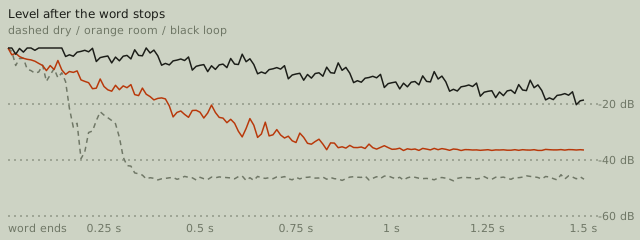
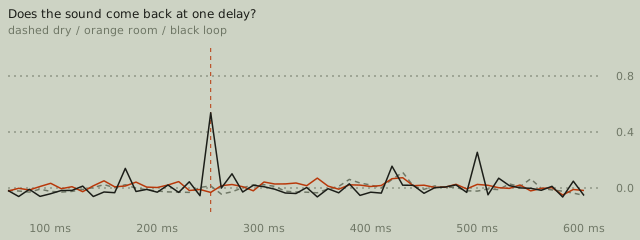
What the numbers say
| Version | Echo check says | Decay | Repeats at | Repeat strength |
|---|---|---|---|---|
| Dry reading | no big-room echo | 0.10 s | 430 ms | 0.11 |
| In a 1.4 second room | a big room that blurs words | 1.23 s | 430 ms | 0.07 |
| The room, after the echo fix | cannot tell, not enough pauses | not timed | 300 ms | 0.07 |
| A 250 ms loop, -3.1 dB per pass | no big-room echo | 0.17 s | 250 ms | 0.54 |
| The loop, after the echo fix | no big-room echo | 0.17 s | 250 ms | 0.54 |
The echo check reads the room as severe, with a decay of 1.23 seconds, and reads the loop as no big-room echo. That is not a mistake in the loop's favour. The check times how the level falls when a word stops; in the loop the level falls in 3 dB steps every 250 ms, which looks like words restarting, not like a tail. So the check does not report feedback, and this site does not claim a fix for it.
The repaired room does not read as a pass either. It reads "cannot tell": once the long tails are turned down there are not enough clean falls for the check to time. Treat that as "listen for yourself", not as "echo gone". In the clip you can still hear a shorter wash between words, which is what a beta dereverb leaves behind. How we test has the thresholds behind these grades.
Fix a room recording you already have
If what you have is a tail, run remove echo. It predicts how much of each moment is the ring of the moments before, from the decay it measured, and turns that share down, leaving the voice and the early reflections that make it sound full. The result is a drier take, not a dry one. Two things help it:
- Pauses. The check and the fix both need a few places where a word stops and the room is heard alone. Twelve seconds of nonstop talking will come back as "cannot tell".
- Noise first. Steady hiss hides the tail. If both are present, take out background noise and then run the echo fix on the result.
If only one section is in a bad room, select that part in the editor and repair it there; the rest of the file stays untouched.
Stop feedback where it starts
Feedback needs a path from a speaker to a microphone. Find the path and close it; no setting in a recording tool substitutes for that.
- Someone is on speakers. Their mic hears their speaker and sends your voice back. Headphones on that end close the loop completely. This is the common case.
- Two devices in one room are on the same call. One device's speaker feeds the other's mic. Mute the mic and the speaker on one of them.
- Your own monitoring is routed back into the input. A "listen to this device" option, a loopback or "stereo mix" input, or an interface sending its playback mix into the recording channel all do this. Pick the physical microphone as the input and turn direct monitoring off while you test.
- The call app's echo cancellation only covers the first case, and only when the speaker and the mic are on the same device. It does not help with a second device or a routing loop.
The physics are not special to calls. Any amplified mic in front of its own speaker does the same thing, which is why a live stage howls when a performer walks in front of the monitor.
Prevent the room next time
A big tail is cheaper to avoid than to remove. Soft things in the room, a mic closer to the mouth, and speaking toward a wall of books instead of a window do more than any fix. Recording a clear voice walks through the quick test that tells you how much room a position picks up before you record the whole thing.
When it is neither
A steady hum, a hiss, or a buzz under the voice is not a room and not a loop. Noise, echo and hum, side by side has each one isolated so you can match what you hear before choosing a fix.