Harsh S Sounds: De-esser or EQ? Hear Both
Harsh S sounds live in a narrow band for a few hundredths of a second at a time. An EQ cut turns that band down all the time; a de-esser only while the S is loud. Hear a bright voice and a dark voice through both, see where each one acts, and set a de-esser from the voice up.
By the fix.fm team · Published · Updated
The short answer
Harsh S sounds live in a narrow band, roughly 5 to 10 kHz, and only for a few hundredths of a second at a time. A fixed EQ cut turns that band down all the time, so it tames the S and dulls every t, f, sh and breath along with it. A de-esser turns the band down only while it is too loud, so the S comes down and the rest of the consonants keep their edge.
That is the whole distinction. Both are a cut in the same band. One is a switch that is always on; the other is a switch the S sound throws.
First, make sure it is sibilance
Three things get called harsh and only one of them is this.
- Sibilance: s, z, sh and sometimes t sound sharp or spitty, on their own, and the vowels are fine. It is worst on close, bright microphones and on voices that naturally have a lot of energy up there.
- Hiss: a steady sheet of high sound under everything, pauses included. That is noise, and the fix is noise reduction, not a de-esser. Noise, echo and hum, side by side has it isolated.
- Distortion: every loud syllable is gritty, not just the S sounds, and the meter was in the red. That is clipping, and a de-esser will not help.
A quick test: find a word with an S and a word without one at the same level. If only the S word hurts, this is the page.
Listen: two voices, two fixes
The same twelve seconds of one voice. Every version is matched to -23 LUFS before MP3 encoding. No autoplay. Headphones help: the difference is in the consonants, not the words.
Voice A as recorded
An ordinary reading. The S sounds are there and not a problem.
Voice A, 8 dB brighter above 5 kHz
Now every S and every breath has an edge. Listen near 2.0 s and 3.4 s.
Bright, then a fixed -8 dB cut at 7 kHz
The S sounds are tamer. So is everything else up there: t, f, sh and the breaths went dull with them.
Bright, then the de-esser at -34 dB
The S sounds come down and the rest of the band is left alone. Listen to the t and the breaths: still bright.
A public-domain LibriVox voice. The harshness is made, not recorded: a 8 dB shelf above 5 kHz, the kind of lift a bright condenser or an "air" EQ adds. Both fixes are plain software written for this page, not fix.fm controls.
A second reader with a darker voice and softer consonants, through exactly the same two settings. Nothing was added to this one.
Voice B as recorded
A darker voice with soft consonants. Nothing here needs taming.
Voice B, the same fixed -8 dB cut
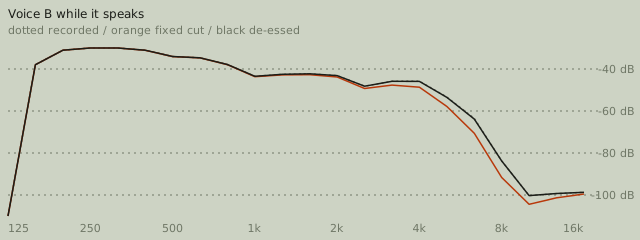
The cut does not know this voice does not need it. What little top end there was is gone.
Voice B, the same de-esser
Nothing crosses the threshold, so nothing is cut. This should sound identical to the recording.
The point of this pair: a fixed cut does the same thing to every voice. A de-esser only does something when there is something to do.
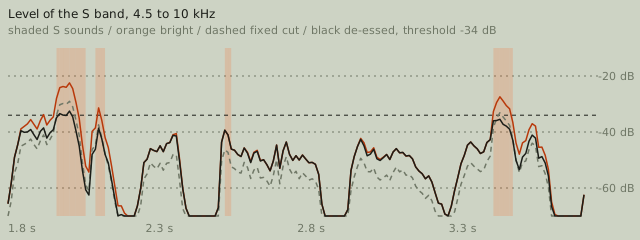
In voice A, go between "fixed cut" and "de-esser" on the word around 3.4 s and then on the breath right after it. The S is about the same in both. The breath is not: the fixed cut has taken the top off it.
In voice B, go between "as recorded" and "fixed cut". The voice got darker. Then between "as recorded" and "de-esser". If you can hear a difference there, it is in one consonant near 1.6 s, by less than 2 dB.
See it
What the numbers say
| Version | S sounds | Other consonants | Voice band | Deepest cut |
|---|---|---|---|---|
| Voice A as recorded | reference | reference | reference | none |
| Voice A, 8 dB brighter above 5 kHz | -31.8 (+7.0) | -47.8 (+6.5) | -25.1 (+0.1) | none |
| Bright, then a fixed -8 dB cut at 7 kHz | -37.9 (+0.9) | -54.5 (-0.2) | -25.4 (-0.2) | none |
| Bright, then the de-esser at -34 dB | -38.3 (+0.5) | -49.1 (+5.2) | -25.1 (+0.1) | 12.0 dB |
| Voice B as recorded | reference | reference | reference | none |
| Voice B, the same fixed -8 dB cut | -46.5 (-4.6) | -60.4 (-4.6) | -23.4 (0.0) | none |
| Voice B, the same de-esser | -42.0 (-0.1) | -56.0 (-0.2) | -23.4 (0.0) | 1.8 dB |
Three things to read off the table.
The two fixes take the S sounds down by nearly the same amount: 6.1 dB for the fixed cut, 6.5 dB for the de-esser. On the S sounds themselves, there is nothing to choose between them.
The other consonants are where they part. The fixed cut takes them down 6.7 dB, as much as the S sounds, because it cannot tell the two apart; the de-esser takes them down 1.3 dB, mostly the tails of S sounds that run into the next consonant. The voice band, 200 Hz to 3 kHz, does not move in any version. Neither fix touches the vowels; the whole argument is about consonants.
Voice B shows what a fixed cut does to a voice that never needed one: its consonants lose 4.6 dB and its S sounds, already soft, lose the same. The de-esser touched it for one moment, by 1.8 dB, and the band averages did not move.
Prevention first
A de-esser is a repair. These cost less.
- Move off axis. Point the microphone at the corner of your mouth rather than straight at it. S sounds are directional and this alone can take 3 to 6 dB off them.
- Back off a little. Sibilance gets worse with proximity on most condensers.
- Turn off the "air" or presence lift on the interface or app if it has one. The bright version of voice A above is exactly that lift.
- If the microphone is simply bright, a gentle, wide shelf is a fair fix. It is the narrow bell on all the time that costs you the consonants.
Choosing and setting a de-esser
Every de-esser has the same three ideas, whatever the knobs are called (the general overview of de-essing lists the common designs; the one on this page is the split-band kind). A frequency or band: where the S lives, usually 5 to 8 kHz for a low voice and 6 to 10 kHz for a high one. A threshold: how loud that band has to get before the de-esser acts. An amount, range or ratio: how hard it pushes the band down once it does.
- Find the band. Sweep a narrow EQ boost while a sibilant word loops until the S jumps out. That is the frequency.
- Set the threshold from the voice up, not from the S down. Play an ordinary sentence and lower the threshold until the meter just flickers on normal consonants, then raise it a little. Now only the S sounds cross it.
- Set the amount for the worst S, not the average one. 4 to 8 dB of reduction on the worst S is plenty. If you need 12 dB or more, the recording is bright enough that a wide shelf should come first.
- Check the t, f and sh sounds and a breath. If they went dull, the threshold is too low or the band too wide.
- Check a quiet passage. Nothing should happen there.
The settings above are the ones that worked for voice A: split at 4.5 kHz, threshold -34 dB, 4:1, 12 dB cap. They are an example of the procedure, not a preset for your voice; voice B needed none of it.
Protect intelligibility
Consonants carry the words. Vowels carry the tone, but you can follow speech with the vowels gone and not with the consonants gone. Every cut in the 4 to 10 kHz band spends intelligibility to buy comfort, and it spends it on quiet listening setups and small speakers first. The two checks that matter after any de-essing: can you still tell "s" from "f" and "sh" from "s" in a sentence you have not heard before, and does a whispered aside still read. If not, you have cut too much.
The same trade appears in reverse on a muffled recording, where the band is being lifted. The noise reduction artifacts page covers the other common way consonants get softened without anyone meaning to.
Limits
- A clipped S is not a loud S. If the S sounds were distorted on the way in, turning them down leaves a quieter distorted S. Clipping first, then consider whether anything else is needed.
- A de-esser cannot add a consonant back. If a recording was already dulled by a fixed cut, there is no undo in a de-esser; the muffled fix is the closest, and it has limits of its own.
- Lisps and whistling S sounds are not harshness. They sit in the same band but they are part of how the person speaks; a de-esser will change the sound and not fix anything.
fix.fm does not have a de-esser yet. The two fixes on this page are plain software written for the comparison so the voice, the level and the timing are identical across versions. If one is added it will go through the same tests as the other fixes before it ships. Until then, recording a clear voice covers the microphone position and gain settings that stop most sibilance before any processing.