Noise Gate vs Noise Reduction: Hear the Difference
A gate is a switch: open while you talk, closed when you stop, so the fan goes quiet between words and stays exactly as loud under them. Noise reduction turns the fan down everywhere, and can take some voice with it. Listen to one reading both ways, see the soft word a badly set gate loses, and set yours from the noise up.
By the fix.fm team · Published · Updated
The short answer
A noise gate turns the sound down when the level drops under a threshold. It makes the pauses quiet. It does nothing to the fan while you are talking, because while you are talking the gate is open and passes everything.
Noise reduction estimates what the background sounds like and turns that part down everywhere, under the words as well as between them. That is the job a gate cannot do, and it comes with a cost a gate never has: it can take some of the voice with the noise.
Neither replaces a quieter room. Both are at their best on a recording that was nearly clean already.
Listen: one reading, both ways
The same twelve seconds of one voice. Every version is matched to -23 LUFS before MP3 encoding, so the quieter one does not sound cleaner just by being quieter. No autoplay. Headphones help: the differences are under the words, not between them.
The reading, no fan
The reference. Listen for the soft word near 5.6 s; it is quiet but complete.
With a fan 18 dB under the voice
A steady hiss under everything. In the pauses it is all you hear; under the words it is still there.
Gate at -24 dB, 60 ms release
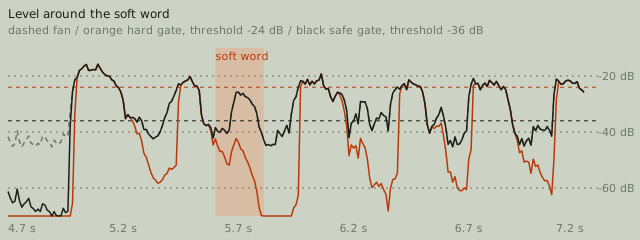
The pauses go dead quiet. The soft word goes with them, and the ends of other words are clipped off.
Gate at -36 dB, 250 ms release
Pauses quiet, every word kept. Now notice that the hiss comes back with each word and leaves with it.
Noise reduction, full amount
The hiss is gone under the words as well as between them. Listen to the soft word and to the consonants for what the cleaning cost.
A public-domain LibriVox voice. The fan is pink noise mixed 18 dB under the speech. The gate is a plain software gate written for this page, not a fix.fm control; the noise reduction is the same denoiser as the background noise fix. Nothing here was recorded with a real fan.
Listen for two places. The pauses: both the gate and the denoiser empty them. The words: under the gate the hiss is still there, arriving with each word and leaving with it, which some people find more distracting than a steady fan. Under the denoiser the hiss is gone there too.
Then listen for the soft word near 5.6 s. The first gate loses it. The second keeps it. The denoiser keeps it. That one word is the whole difference between a gate set from the words down and a gate set from the noise up.
See it
What the numbers say
| Version | Noise check | In the pauses | Under the words | Soft word |
|---|---|---|---|---|
| The reading, no fan | 63.2 dB | -85.0 dBFS | -61.3 dBFS | reference |
| With a fan 18 dB under the voice | 25.0 dB | -46.8 dBFS | -52.9 dBFS | +0.1 dB |
| Gate at -24 dB, 60 ms release | 64.6 dB | -86.6 dBFS | -51.1 dBFS | -16.9 dB |
| Gate at -36 dB, 250 ms release | 47.5 dB | -69.3 dBFS | -53.0 dBFS | +0.1 dB |
| Noise reduction, full amount | 68.4 dB | -89.8 dBFS | -60.8 dBFS | -0.3 dB |
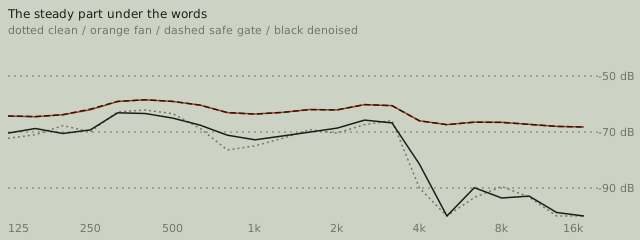
Read the "In the pauses" and "Under the words" columns together. The hard gate takes the pauses from -46.8 to -86.6 dBFS, 40 dB, the full range it was set to. Under the words it leaves the fan exactly where it was. The safe gate does the same, more gently: the pauses fall 22 dB, and the hiss under the words is untouched to the decimal. The denoiser is the only version whose under-the-words number moves, from -52.9 back to -60.8 dBFS, within half a decibel of the clean reading.
The noise check reads all three as fixed, and the gates score as well as the denoiser. That is a limit of the check, not a point for the gates: it listens to the stillest moments, and a gate makes the stillest moments silent by definition. A pass on that check after gating says the pauses are quiet. It does not say the recording is clean. How we test has the threshold behind the grade.
Threshold, attack, hold, release, range
Every gate has the same handful of controls, whatever a plug-in calls them.
- Threshold: the level the sound has to be over for the gate to open. Set it a few dB over the noise, not a few dB under the words. The only question is "how loud is the fan", never "how loud am I".
- Attack: how fast the gate opens once the level is over the threshold. Fast, a few milliseconds, or the first consonant of each word is clipped.
- Hold: how long the gate stays open after the level drops under the threshold. Long enough to bridge the gap inside a word, 50 to 150 ms.
- Release: how long the gate takes to close after the hold. Slow, 100 to 300 ms, so the ends of words and breaths fade instead of being chopped.
- Range, sometimes called floor: how far down the gate turns the sound when closed. Full silence sounds like the recording stopping. 20 to 40 dB down keeps a little room tone and sounds like a quieter room.
The hard setting above is what you get by setting the threshold while listening to yourself talk: -24 dB, which is where the loud words live, with a quick 60 ms release. Everything quieter than a loud word is treated as noise, including the soft word. The safe setting is what you get by setting the threshold while listening to the fan alone: -36 dB, 11 dB over the fan, then a 120 ms hold and a 250 ms release so nothing is cut short. Both are described in full on the page that explains gates in general; the numbers here are the ones that worked for this voice and this fan, not a preset for yours.
Two safe ways to start
Set a gate from the noise up:
- Record five seconds of the room with nothing said, in the position and with the gain you will actually use.
- Read the level of that silence. Set the threshold 6 to 10 dB over it.
- Set attack fast, hold around 100 ms, release around 200 ms, range around -30 dB.
- Say something quietly, an aside at half your normal level. If it is cut, lower the threshold or raise the hold. If the fan pumps in and out between words in a way you can hear, the fan is too loud for a gate; see below.
Set noise reduction from the voice down:
- Start at the lowest amount and raise it until the pauses are quiet enough, not until they are silent.
- Listen to consonants, especially s, f and t, and to the ends of words. If they go soft or watery, back off. What the artifacts sound like walks through each one.
- If the fan is only objectionable in one section, repair that section in the editor and leave the rest alone.
The background noise fix is the second procedure with the amount control exposed. fix.fm does not have a gate control; the gate in these examples is a plain software gate written for this page so the comparison is fair.
Why a gate alone leaves the fan under the words
Because a gate is a switch, not a filter. Open, it passes the fan and the voice. Closed, it passes neither. There is no setting between those that passes the voice without the fan, so the loudest the fan ever is in a gated recording is exactly as loud as it was in the original. What changes is that the fan now starts and stops with your voice. For a quiet fan, 25 dB or more under the speech, that is fine and often nobody notices. For a louder one, a hiss that pumps with the words is more noticeable than a steady one, and the recording sounds worse gated than it did before.
Removing silence in an editor is not gating either. Cutting pauses out shortens the recording and leaves the fan under every word that remains.
When neither will do
- Another voice. A gate opens for anyone over the threshold; a denoiser trained on speech keeps speech, theirs included. A second speaker in the room, a television, a crowd: none of these are background noise to either tool. Move or re-record.
- A fan loud enough to be near the speech. Under about 15 dB of separation, the gate pumps and the denoiser starts to take consonants. Turn the fan off while recording; it costs nothing.
- Sound that is not steady. A gate expects quiet between words; a denoiser expects a background that stays the same. A door, a cough, keys on a desk: both leave them in. Cut them in the editor.
If you are not sure yet what the sound under your voice is, noise, echo and hum, side by side has each one isolated. And the cheapest version of all of this is still a quieter room and a closer mic, which recording a clear voice covers before any of these tools come up.