Clipping vs Limiting: Hear and See the Difference
One voice, pushed the same 6 dB over full scale into a hard clipper and into a limiter. Hear the difference with the levels matched, see the same 30 milliseconds of waveform in each version, and read what repair recovered and where it stopped.
By the fix.fm team · Published · Updated
The short answer
Clipping happens after the fact: the signal asked for a level the converter or the file could not hold, so every sample above the ceiling was replaced by the ceiling. The top of the waveform is gone. Limiting happens before the fact: a limiter watches the level, turns the gain down for a few milliseconds while a peak passes, and lets it back up. The top of the waveform is still there, just lower.
That difference decides what you can do later. A limited take can be left alone or mixed louder. A clipped take can only be estimated back, and only when little was cut off. Below is one voice pushed the same 6 dB over full scale into a hard clipper and into our limiter, so you can hear and see both, followed by what repair recovers and what it does not.
The same ten seconds of one voice. Every version is matched to -23 LUFS before MP3 encoding, so louder does not win. No autoplay. Use headphones at a comfortable level.
Dry voice
The reference. Consonants have a clean edge and the loud words stay round.
Clipped, 6 dB over full scale
Loud words crackle and sound harder. Quiet words are untouched.
Limited, same 6 dB drive
Same loudness at the input, but the peaks were turned down ahead of time instead of cut off.
Clipped, then repaired
The crackle is mostly gone. Listen to the loudest word: it is an estimate of the peak, not the original.
Clipped, 18 dB over full scale
Almost every voiced sound is flattened. This is the unrepairable case.
The extreme take after repair
Less buzz, still rough. Too much of the waveform was missing to rebuild.
A public-domain LibriVox voice, driven over full scale in software. The clipper and the limiter received the same drive. The repaired versions are the output of our distortion fixer at full amount. Nothing here was recorded through an overloaded microphone preamp.
Listen without being fooled by loud
Clipping makes a recording louder before it makes it worse, and louder almost always sounds better on first listen. The examples above are matched to the same integrated loudness, which removes that advantage. With the level out of the way, the clipped take has a hard, crackling edge on the loudest words while quiet words are untouched; it sounds like the problem comes and goes with the speaker's emphasis. The limited take has no crackle. If you listen for it, the loudest syllables are held back slightly, which is the gain moving.
The repaired take is close to the dry voice on this material. The extreme take, clipped 18 dB over, is included because it is the case people usually ask about: nearly a quarter of the audible samples are flattened, and repair cannot bring that back. It sounds less buzzy afterwards and still wrong.
See it: the same 30 milliseconds, five ways
Every figure shows the same window around the loudest word, on the same scale, with full scale marked.
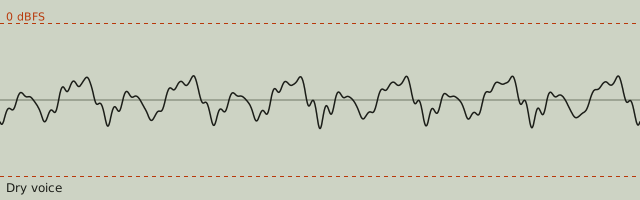
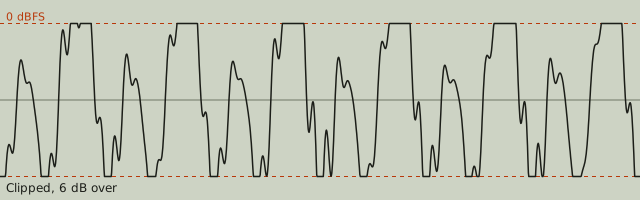
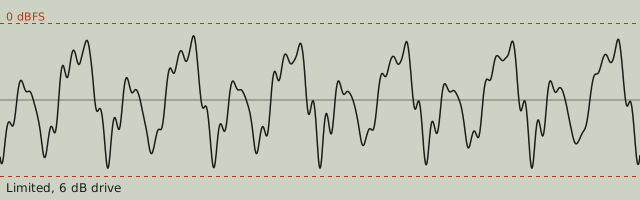
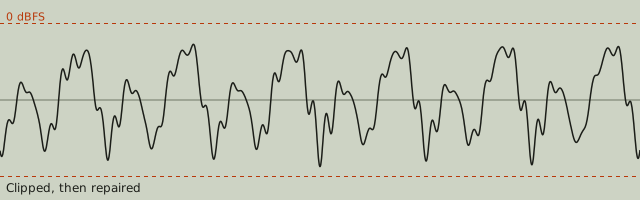
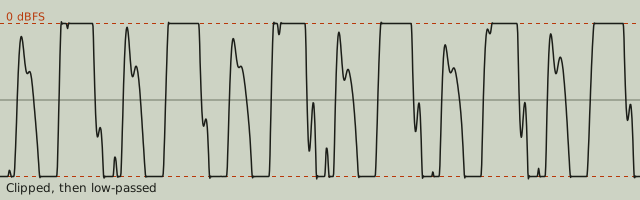
Two things are easy to miss in those pictures. First, the limited waveform looks like the dry one at a lower level, not like a smaller clipped one: nothing was cut, the gain moved. Second, the repaired waveform's peaks are a guess. They are shaped by the samples on either side of each shelf, and they land above the shelf because a cut-off peak was at least that loud, but no process knows exactly how high the original went.
What the numbers say
| Version | Clipped samples | True peak | Match to dry | Shape, worst 5% | Our check says |
|---|---|---|---|---|---|
| Dry voice | 0% | -8.6 dBTP | reference | 1.000 | No crackle from clipping |
| Clipped, 6 dB over | 3.7% | +0.1 dBTP | 18 dB | 0.987 | Badly flattened |
| Limited, 6 dB drive | 0% | -1.0 dBTP | 12.6 dB | 0.999 | No crackle from clipping |
| Clipped, then repaired | 0% | -1.2 dBTP | 29.3 dB | 0.999 | No crackle from clipping |
| Clipped, then low-passed | 10.4% | +0.4 dBTP | 11 dB | 0.916 | Badly flattened |
| Clipped, 18 dB over | 24% | +1.0 dBTP | 6 dB | 0.895 | Badly flattened |
| Extreme take, repaired | 0% | -1.2 dBTP | 9.8 dB | 0.915 | No crackle from clipping |
The match-to-dry column rewards sample-for-sample agreement after one fixed gain. The clipped take scores 18 dB against the dry voice, the repaired take 29.3 dB. Read that as "most of the error is gone", not as "the original was recovered". The extreme take goes from 6 dB to 9.8 dB after the same repair: better, still far from the voice, and this is the honest ceiling of interpolation when too much is missing.
The limited take scores a lower match than the clipped one, 12.6 dB, even though it sounds clean. That is the metric, not the sound: a limiter changes gain over time, and a single fixed gain cannot undo that, so every held-back syllable counts as error. The shape column, which ignores slow gain and only asks whether each 20 ms of waveform has the same form, puts the limited take at 0.999 next to the dry voice and shows the clipped take dropping to 0.987 in its worst windows. Use both columns together; neither one is a quality score on its own.
Our check does not flag the limited take, which matters: a detector that called limiting "distortion" would send people to a repair they do not need. It also stops flagging the extreme take after repair. That is correct about the flat tops, which are gone, and says nothing about whether the voice came back. The two numbers next to it do.
Sample peaks, true peaks and files that were already lossy
A sample peak is the largest value stored in the file. A true peak is the level the waveform reaches between samples once it is turned back into a continuous signal, estimated by oversampling as described in ITU-R BS.1770. The limited take here is held under -1 dBTP, not -1 dBFS, for that reason; a file whose samples never exceed full scale can still overload a converter or an MP3 encoder between them. LUFS vs dBFS vs dBTP goes through the three scales.
Clipping that went through a lossy encoder no longer has flat tops. The encoder smooths the shelves and the result ripples around the old ceiling, sometimes above it. The low-passed row in the table, clipped 10 dB over and then filtered at 16 kHz, is a stand-in for that: more than ten percent of samples still pile up near one level, the true peak pokes over full scale, and the check still reads it as badly flattened, because it looks for a pile of samples at one level rather than for identical values. The repair treats such a file by rebuilding from a little under the pile instead of from the exact ceiling. That is also why a lossy clipped file repairs less well than the same clipping in WAV: the shelf edges that tell the model where to start are blurred.
Fix what remains recoverable
Open the clipped file in the distorted audio fixer. It measures the pile of flattened samples, rebuilds the cut-off runs with an autoregressive model fitted on the surrounding samples, pins any rebuilt sample that landed below the shelf back up to it, and brings the result under -1 dBTP. The Amount control blends between the clipped and rebuilt signals; the examples above use the full amount. Listen to the loudest word before and after. If it is a clean estimate, keep it. If it still buzzes, the take is in extreme territory and the fixer will not pretend otherwise.
Two problems look like clipping and are not. A microphone capsule or preamp driven into distortion produces a signal that was already bent before it was stored, with no flat shelf in the file, and no declipper can target it. Harsh "s" sounds and a boomy proximity effect are frequency problems, not level problems. Run the checks first; the fixer only rebuilds when it finds a pile.
Prevent the next clipped take
A limiter at the end of a chain is insurance, not a recording level. Record with the loudest expected moment peaking well under full scale (the dry take here peaks at -8.6 dBTP, and more headroom than that is normal), use 24-bit if the device offers it so the lower level costs nothing, and raise the level afterwards. Record a clear voice covers gain staging and distance. If the finished file is then too quiet for its platform, that is a loudness job: Compression vs normalization explains which process to reach for, and the LUFS meter tells you where the file sits before and after.